> ## Documentation Index
> Fetch the complete documentation index at: https://docs.1archive.io/llms.txt
> Use this file to discover all available pages before exploring further.
# Overview
> How 1Archive decides who can see and do what. Start here for the org-wide roles, then jump to the details for Sources, Collections, or admin tasks.
Permissions in 1Archive sit in two places: the same idea as separating **who someone is to the account** from **what they can do on a specific thing**.
First, every person has one **organization role** that follows them everywhere: **Owner**, **Admin**, **Editor**, or **Viewer**. That role is **account-wide**: it sets their **permission boundary**, the most they're allowed to do anywhere in 1Archive. It is separate from the access they get on individual Sources and Collections.
Second, people pick up **Can Edit** or **Can View** on Sources (and folders in the catalog tree), and **Owner**, **Admin**, **Editor**, or **Viewer** on Collections, when those items are shared with them or marked visible to the org. Those grants decide **which** Sources and Collections they can reach and what they can do there. The org role sets the permission boundary for Sources — but Collections work differently. A Viewer can create their own Collections and make changes within them, even though they can't edit a Source directly.
This page is the home base for organization roles. For how shares pass down on Sources, how Collection roles work, and what Owners and Admins can do on top of all that, use the cards below.
## Organization roles (account-wide)
| Role | What they do |
| ---------- | --------------------------------------------------------------------------------------------------------------------------------------------------------------------------------------------------------------------- |
| **Owner** | Runs the org. Handles billing, invites and removes people, and has the highest level of access on every Source and Collection. |
| **Admin** | Same as Owner for day-to-day work. The only things an Admin can't do are billing and deleting the organization. |
| **Editor** | A regular contributor. Sees only the Sources and Collections they've been added to, or ones marked visible to the whole org. Inside those, can make, change, or remove things according to the share they were given. |
| **Viewer** | Read-only on Sources. Sees only what they've been added to, and can't edit Sources directly. Can still create Collections from Sources they have access to, and make changes within those Collections. |
## Dig into the details
How **Can Edit** and **Can View** on a folder pass down to everything inside
it, and what someone actually sees when their share sits deep in the tree.
The four Collection roles (Owner through Viewer), what each one can do on
that Collection, and the two ways to share: direct to **Shared with me** or
through a folder.
What Owners and Admins can do that no one else can, where the line sits on
reading private content, and the org-wide settings for Collections and share
links.
Removing someone who's leaving: handing off their Collections, revoking every
share and link they held, and ending their sessions.
## The rules that apply everywhere
 Three rules govern every access check in 1Archive.
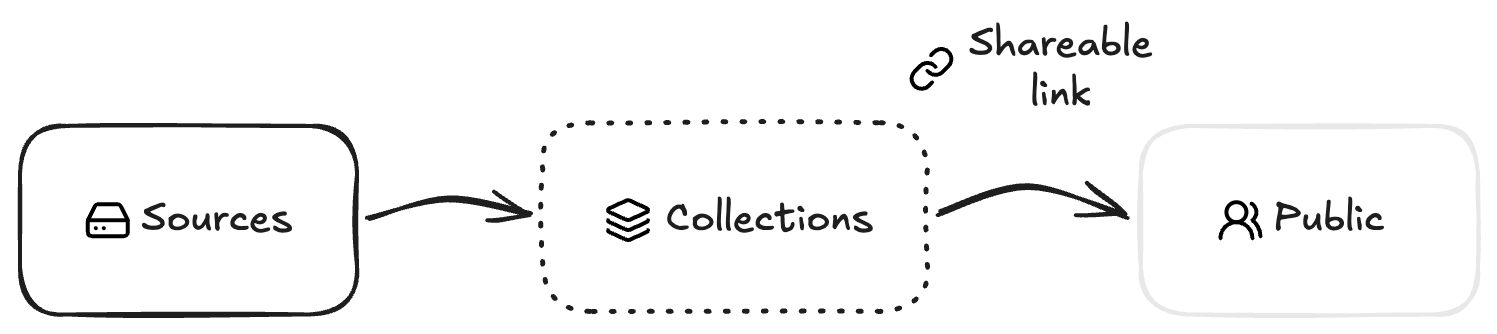
* **Your org's Sources are a walled garden.** Only people inside your org can access its Sources. No share, no setting, no link opens that up. Collections are how you reach across that wall — they let you share selected files with anyone, inside or outside the org, including collaborators who've never set foot in 1Archive. A Collection file is linked to the original asset, not a copy of it. Rename a file inside a Collection and the Source file stays untouched — the Collection just points to the same underlying asset under a different name. If the original asset is deleted from the Source, the Collection file goes with it.
* **The highest role wins on the same item.** If someone reaches the same folder, Source, or Collection through more than one path (a folder share, a direct share, and a "visible to the whole org" mark all at once), they get the **most permissive** of those grants on **that** item. Broader access (say, Can View on a parent folder) does not cancel out a stronger, more specific share (say, Can Edit on one Source inside it). 1Archive never quietly lowers access.
* **Viewer is a permission boundary for Sources, not for Collections.** Viewers stay read-only on every Source they can see — that can't be changed. But Viewers can create their own Collections from any Source they have access to, and can make changes within those Collections. Owners and Admins stay in control: there are explicit settings that determine whether any user can create Collections at all, and whether Collections can be shared outside the org.
Three rules govern every access check in 1Archive.
* **Your org's Sources are a walled garden.** Only people inside your org can access its Sources. No share, no setting, no link opens that up. Collections are how you reach across that wall — they let you share selected files with anyone, inside or outside the org, including collaborators who've never set foot in 1Archive. A Collection file is linked to the original asset, not a copy of it. Rename a file inside a Collection and the Source file stays untouched — the Collection just points to the same underlying asset under a different name. If the original asset is deleted from the Source, the Collection file goes with it.
* **The highest role wins on the same item.** If someone reaches the same folder, Source, or Collection through more than one path (a folder share, a direct share, and a "visible to the whole org" mark all at once), they get the **most permissive** of those grants on **that** item. Broader access (say, Can View on a parent folder) does not cancel out a stronger, more specific share (say, Can Edit on one Source inside it). 1Archive never quietly lowers access.
* **Viewer is a permission boundary for Sources, not for Collections.** Viewers stay read-only on every Source they can see — that can't be changed. But Viewers can create their own Collections from any Source they have access to, and can make changes within those Collections. Owners and Admins stay in control: there are explicit settings that determine whether any user can create Collections at all, and whether Collections can be shared outside the org.