

Organization roles (account-wide)
Dig into the details
Source permissions
How Can Edit and Can View on a folder pass down to everything inside
it, and what someone actually sees when their share sits deep in the tree.
Collection permissions
The four Collection roles (Owner through Viewer), what each one can do on
that Collection, and the two ways to share: direct to Shared with me or
through a folder.
Owners & Admins
What Owners and Admins can do that no one else can, where the line sits on
reading private content, and the org-wide settings for Collections and share
links.
Off-boarding
Removing someone who’s leaving: handing off their Collections, revoking every
share and link they held, and ending their sessions.
The rules that apply everywhere
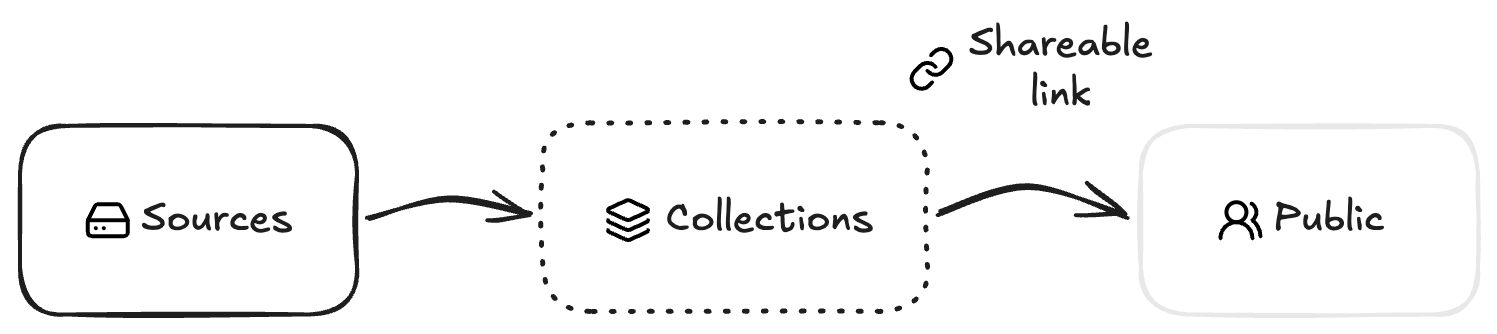

- Your org’s Sources are a walled garden. Only people inside your org can access its Sources. No share, no setting, no link opens that up. Collections are how you reach across that wall — they let you share selected files with anyone, inside or outside the org, including collaborators who’ve never set foot in 1Archive. A Collection file is linked to the original asset, not a copy of it. Rename a file inside a Collection and the Source file stays untouched — the Collection just points to the same underlying asset under a different name. If the original asset is deleted from the Source, the Collection file goes with it.
- The highest role wins on the same item. If someone reaches the same folder, Source, or Collection through more than one path (a folder share, a direct share, and a “visible to the whole org” mark all at once), they get the most permissive of those grants on that item. Broader access (say, Can View on a parent folder) does not cancel out a stronger, more specific share (say, Can Edit on one Source inside it). Collections have one exception: a share made to a person directly takes priority over their team shares, even when it gives less access. See how overlapping shares combine.
- Viewers never change files on a Source, whatever you share with them. On Sources the whole org can see, they’re read-only. On a restricted Source or folder, a Can Edit share lets a Viewer rename it and organize the catalog there: create, rename, and delete folders. Moving a Source or folder into another folder is limited to Owners and Admins, whatever share someone holds. Adding, renaming, moving, or deleting files still takes an Editor, so give someone that role if they need it. Viewers can also create their own Collections from any Source they have access to, and can make changes within those Collections. Owners and Admins stay in control of web links: they can turn off public or password-protected links for the whole organization.